Most monitor stand mistakes come down to two numbers, really: the weight rating and the VESA hole pattern. Skip checking both and the arm droops, or the screen won’t attach at all. Weight and hole pattern decide it. This page sorts the best monitor stands for a standing desk by mounting method, load limit and reach, so you can match the stand to the screen and the desk top, not just the photo.
As an Amazon Associate we earn from qualifying purchases. This does not affect the price you pay.
CERTAIN CONTENT THAT APPEARS ON THIS SITE COMES FROM AMAZON. THIS CONTENT IS PROVIDED ‘AS IS’ AND IS SUBJECT TO CHANGE OR REMOVAL AT ANY TIME.
Short answer: the VIVO Extra Tall Single Monitor Desk Mount pairs a 39-inch pole and a fully articulating arm with clamp or grommet mounting for desk tops up to 4 inches thick.
| Product | Best for | Weight rating | Mounting method |
|---|---|---|---|
| VIVO Extra Tall Single Monitor Desk Mount | Best overall | 22 lbs | C-clamp or grommet, desks up to 4 inches thick |
| VIVO Single Monitor Desk Stand | Best value | 22 lbs | Freestanding steel base |
| VIVO Extra Tall Single Monitor Desk Stand | Tall freestanding pole | 22 lbs | Freestanding steel base, 38-inch height |
| HUANUO Monitor Stand | Heavier screens, no clamp | 44 lbs | Freestanding, tempered-glass base |
| HUANUO FlowLift Dual Monitor Stand | Two-screen setups | 4.4 to 19.8 lbs per arm | Dual C-clamp or grommet base |
CozyHomeCanvas is funded by affiliate commission. Our picks come from comparing published specifications and documented features against what matters in the category — no brand pays for a place on this page. If you buy through a link here we may earn a commission at no extra cost to you, and it pays for the research behind the next guide. Full disclosure.
VIVO Extra Tall Single Monitor Desk Mount (39-Inch Pole, Clamp or Grommet)
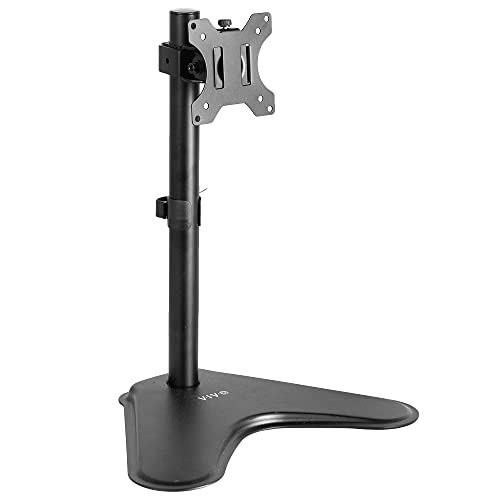
VIVO Extra Tall Single Monitor Desk Stand (Tall Freestanding Pole)

VIVO Extra Tall Single Monitor Desk Mount (39-Inch Pole, Clamp or Grommet)
- BrandVIVO
- ModelSTAND-V011
- Dimensions18.5 inches x 18.5 inches x 48.5 inches
- Weight8.95 pounds
- Size / capacity39" tall
- ColourBlack
- Warranty3 Year Warranty
Quick take: The only pick here that combines a tall pole, a wide-range articulating arm and a fixed mount, which is why it suits most sit-stand desks.
The STAND-V011 is a black steel-style single-arm mount on a 39-inch center pole, with a listed footprint of 18.5 x 18.5 x 48.5 inches and a weight of 8.95 pounds. Most of that mass sits in the base and pole, which is where a tall lever needs it. It takes screens up to 22 lbs with VESA 75×75 or 100×100 patterns, and it covers ultrawides up to 38 inches by the manufacturer’s claim. You’ll mount it with a C-clamp on desk tops up to 4 inches thick, or use an optional grommet mount. The weight stays low.
Because the clamp grips the desk itself, the screen travels with the desk when it rises and falls. The monitor slides along the pole to find eye level in both positions, and OSHA’s workstation guidance puts the top of the screen at roughly that height. The arm offers +90 to -90 degree tilt, 360 degree swivel and 360 degree rotation, far more freedom than the freestanding VIVO stands. The trade-off is that the 22 lb ceiling sits well below the HUANUO single stand’s 44 lbs. The listing also never says whether the arm uses a gas spring. The listing is silent on that. A hollow-core or glass desk top, or a frame crossbar under the clamp point, can rule this mount out. It’s among the best monitor stands for a standing desk. That’s precisely because a wobble-prone, long-reach design is offset by a heavy base and a 3 year warranty.
Pros:
- 39-inch pole — enough vertical travel to put a monitor at eye level for both sitting and standing.
- Clamp or grommet mounting — suits desks with or without a cable hole, and avoids drilling.
- Up to 4 inches of desk thickness — covers thick butcher-block and bamboo tops.
- Wide articulation — 360 degree swivel and rotation allow portrait orientation for coding or documents.
- Ultrawide claim up to 38 inches — within the 22 lb limit, a 34-inch ultrawide is plausible.
Cons:
- 22 lb cap — heavy ultrawides can exceed this, and the manufacturer lists no margin.
- Clamp dependence — thin, hollow or glass desk tops are poor candidates, and frame crossbars can block the clamp.
- Tall lever — a 39-inch pole plus an extended arm magnifies any looseness when the desk moves.
Final Thoughts
Best overall: Solid-top standing desks and a single screen up to 22 lbs that needs to stay at eye level across the full height range. Pass on this if: the desk top is glass, hollow or thin, or the monitor is heavier than 22 lbs.
VIVO Single Monitor Desk Stand (Freestanding Steel Base)
- BrandVIVO
- ModelSTAND-V001H
- Dimensions11.22 inches x 3.15 inches x 17.91 inches
- Weight6.61 pounds
- Size / capacity18" Tall
- ColourBlack
- Warranty3 Year Warranty
The short version: A no-clamp, no-drill stand that costs little and suits a desk where the frame blocks a clamp.
The STAND-V001H is a freestanding steel-base stand, 18 inches tall, with listed dimensions of 11.22 x 3.15 x 17.91 inches and a weight of 6.61 pounds. The same 22 lb limit and VESA 75×75 / 100×100 compatibility apply as on the clamp mount, and the title claims fit for regular screens up to 32 inches and ultrawides up to 38 inches. The open-top-slot VESA plate means the bracket can be hooked on rather than threaded in place.
Standing on the desk top, this stand ignores the desk thickness and material entirely, which makes it the answer to crossbar and cable tray conflicts. The height range is the weak point. An 18-inch pole lifts the screen but doesn’t give the tall reach of the extra-tall models. Movement is limited to +15 to -15 degree tilt and 90 degree swivel, with 360 degree rotation. The freestanding footprint also takes desk space that a clamp mount would hand back. Anything freestanding relies on the desk top staying steady, and the listing gives no base-width or anti-slip detail.
Pros:
- No clamp, no drilling — works on glass, thin or oddly shaped desk tops.
- 6.61 lb steel build — light enough to move between desks, yet a steel base resists tipping.
- VESA 75×75 and 100×100 — covers most screens in the 13 to 32 inch range.
- 360 degree rotation — portrait mode is possible on a budget.
- Integrated cable management — cords stay together while the desk moves.
Cons:
- Short 18-inch pole — a sitting-height setup may not reach eye level when standing.
- Narrow tilt and swivel — only 15 degrees of tilt each way.
- Eats desk space — the base stays on the desk surface.
Why It Earns a Spot
Ideal for: Budget-conscious buyers who need a simple riser-style stand and cannot clamp. Not great if: the goal is a screen that reaches standing eye level without stacking anything underneath.
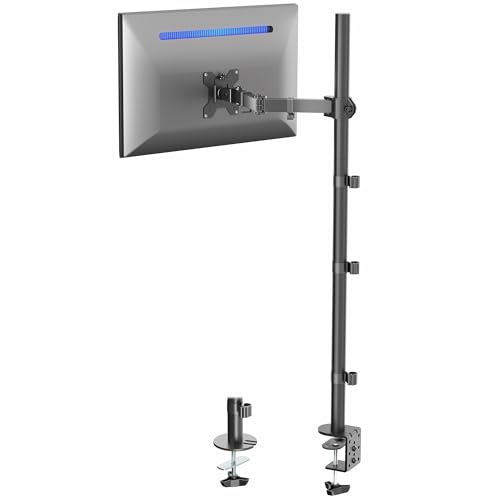
VIVO Extra Tall Single Monitor Desk Stand (Tall Freestanding Pole)
- BrandVIVO
- ModelSTAND-V011H
- Weight8.95 pounds
- Size / capacity38" Tall
- ColourBlack
- Warranty3 Year Warranty
In a nutshell: The tall-pole freestanding option for buyers who want standing-height reach without touching the desk edge.
The STAND-V011H pairs a freestanding steel base with a pole sold as 40 inches tall in the title, though the spec table lists 38 inches. The title and table disagree. The weight is 8.95 pounds, and dimensions aren’t listed. It’s designed for 13 to 27 inch screens up to 22 lbs on VESA 75×75 or 100×100, so the ultrawides that the other VIVO models claim are out here.
A tall pole on a freestanding base is a leverage problem: all the monitor weight sits well above the footing, and a desk that shakes at full height will pass that shake straight to the screen. The base contact patch and any anti-skid detail go unstated. The bracket gives +45 to -45 degree tilt and 180 degree swivel. Height changes require loosening and tightening the bracket bolt, and the manufacturer states plainly this is not meant for fluid, frequent movement. The practical consequence is that the stand suits a fixed eye-level setting better than a screen that rides up and down on the pole every day. Compared with the clamp mount, the arm cannot extend outward.
Pros:
- 38 to 40-inch pole — the tallest freestanding reach on this list.
- No clamp needed — useful when a crossbar or cable tray blocks the underside.
- 45 degree tilt and 180 degree swivel — wider than the shorter VIVO stand.
- 8.95 lb steel build — gives the pole some ballast.
- 3 year warranty — matches the other VIVO models.
Cons:
- 13 to 27 inch only — ultrawides and larger monitors are excluded.
- Bolt-based height adjustment — repositioning is deliberate, not quick.
- Wobble risk — a tall pole on a base only, atop a moving desk.
The Real Deal
Perfect for: One 27-inch-or-smaller screen set once at eye level on a solid, steady desk. Think twice if: an ultrawide is in play, or the height gets changed frequently.
HUANUO Monitor Stand (44 lb Rating, Tempered-Glass Base)

- BrandHUANUO
- ModelHNTVS29
- Size / capacity13-34 Inch
- ColourBlack
Here’s the deal: The highest weight rating of the single stands, built for large, heavy monitors on a desk that cannot take a clamp.
The HNTVS29 supports 13 to 34 inch screens up to 44 lbs on VESA 75×75 or 100×100, a limit double that of the VIVO singles. The column is steel, the base is tempered glass, and the column stands 17.24 inches tall. Weight, dimensions and warranty are not listed in the spec table.
The stand has five height options from 9.27 to 15.26 inches, plus swivel of +/-50 degrees and tilt of +10/-15 degrees, with 360 degree rotation. That range is a riser’s, not a standing-eye-level pole’s. With the desk itself doing the sit-stand work, this stand only adds a modest lift. For tall users standing at full desk height, 15 inches may be enough; for others, it adds nothing. The heavier rating is the real selling point, since a 34-inch ultrawide is likelier to sit comfortably inside 44 lbs than inside 22. The listing notes two cable clips, and it also warns to verify screen size, weight and VESA pattern first. A glass base on a desk that moves is worth checking for slip, and the listing gives no base dimensions or grip detail.
Pros:
- 44 lb rating — room for heavier 34-inch screens.
- Steel column, tempered-glass base — a stiff, flat footing.
- Five height settings — 9.27 to 15.26 inches, set once and left.
- No drilling or clamping — desk thickness and material do not matter.
- Portrait mode — 360 degree rotation is included.
Cons:
- Limited reach — the maximum 15.26 inches does not match the tall-pole models.
- Unlisted weight, dimensions and warranty — key buying details are missing.
- Modest tilt — +10 / -15 degrees leaves little room to fine-tune.
Who Should Buy This
Great match for: Heavy 27 to 34 inch monitors on desks where a clamp is not an option. Pass on this if: the screen has to reach eye level for a standing user of average height with the base alone.
HUANUO FlowLift Dual Monitor Stand (Dual C-Clamp Arms)

- BrandHUANUO
- ModelHNDS6
- Dimensions16.06 inches x 12.0 inches x 6.85 inches
- Weight11.0 pounds
- Size / capacity13-32 Inch
- ColourBlack
- Warranty5 year manufacturer
What sets it apart: The only dual-screen mount here, with a five-year warranty and a base built to share load across the desk edge.
The HNDS6 holds two screens of 13 to 32 inches, each between 4.4 and 19.8 lbs, on VESA 75×75 or 100×100. It ships with a C-clamp and grommet base, with a listed size of 16.06 x 12.0 x 6.85 inches and a weight of 11.0 pounds. The 5 year manufacturer warranty is the longest on the page.
The desk requirements are stricter than any other pick. The manufacturer recommends wooden desks only, rules out plastic and glass, and gives a thickness range of 0.59 to 3.54 inches. The 4.4 lb minimum per screen also means a very light monitor falls outside the spec. Dual arms mean twice the leverage at the clamp, so a thin or weak desk top is the first thing to fail. The single-arm VIVO mounts accept thicker desks and heavier single monitors, but the FlowLift is simply the answer if two screens are needed. It is also one of the best monitor stands for a standing desk when bezel-to-bezel alignment matters, since both arms share one base. Each arm gets full-motion adjustment, according to the listing.
Pros:
- Dual arms, one base — frees desk space compared with two separate stands.
- 5 year warranty — longest coverage in this group.
- Dual C-clamp structure — a larger platform spreads the clamping load.
- 19.8 lb per arm — accommodates most 27 to 32 inch screens.
- Cable management — wires route along the arms.
Cons:
- Wooden desks only — plastic and glass tops are explicitly excluded.
- 32-inch limit — ultrawides beyond that are not listed as supported.
- 4.4 lb minimum — very light monitors are outside the stated range.
Final Thoughts
Ideal for: Two matched screens on a solid wooden standing desk, including those running a spreadsheet and a reference window side by side. Not great if: the desk top is glass, plastic or paper-thin, or one 34-inch ultrawide is the plan.
How These Monitor Stands Were Chosen
These picks come from comparing published specifications, mounting methods and documented features. None of the products were tested hands-on. Weight rating, VESA pattern and mounting method carried the most weight, followed by pole height and the joint adjustment range, since those decide whether a screen reaches eye level in both desk positions without wobble. Missing data was treated as a negative. Before ordering, check the monitor’s weight and VESA pattern against the table above, then check the desk’s thickness, material and underside clearance for a clamp.
How to Choose the Best Monitor Stands for a Standing Desk
Start with VESA and weight, not screen size
The VESA Flat Display Mounting Interface standard usually shows up as four threaded holes on the back of the monitor. Every stand here accepts 75×75 or 100×100 mm patterns, so a monitor with neither needs an adapter or a different stand. Display size is the screen’s visible diagonal, measured corner to corner, and says little about weight. A 34-inch ultrawide can be heavy enough to exceed the 22 lb limit of the VIVO stands while sitting inside the HUANUO single stand’s 44 lbs.
Match the mount to the desk top
Clamp mounts need a solid, thick-enough top. The VIVO arm lists up to 4 inches; the FlowLift lists 0.59 to 3.54 inches and wooden only. Hollow-core, glass and thin tops are poor clamp candidates, and a frame crossbar or cable tray under the edge can block the clamp. Freestanding bases skip those problems but use desk space and depend on a steady desk. For more on the topic, see this monitor stand buying guide.
Reach: will the screen get to eye level standing?
Sit-stand workstations span a wide height range, from 70 cm up to 128 cm (28 to 50 inches), so the stand has to cover the desk’s own span. A 39-inch pole slides the screen with the desk; a 15-inch riser does not. Taller poles add leverage, so joint stiffness matters more. A desk height that suits the chair should be set before the monitor height is dialled in.
Is a standing desk worth the setup?
Alternating sitting and standing may cut sedentary time by somewhere between 30 minutes and two hours a workday, although the evidence behind that is low quality. The evidence is weak. That’s a reason to get monitor height right, not a promise. A practical look at standing duration and a standing versus sitting desk comparison help set expectations.
Do the best laptop stands for a standing desk follow the same rules?
Largely yes: weight rating, desk fit and height reach decide the outcome. A laptop stand raises the screen, which pushes the keys up too. Keyboard height becomes a question. A single or dual monitor arm leaves the keyboard on the desk.
Our Final Recommendation
The VIVO Extra Tall Single Monitor Desk Mount is the overall winner, thanks to its 39-inch pole, wide articulation and clamp or grommet mounting up to 4 inches thick. The VIVO Single Monitor Desk Stand is the best value, a freestanding steel stand that skips the clamp question. The tall-pole VIVO stand suits fixed eye-level setups, the HUANUO single stand carries the heaviest loads, and the FlowLift is the dual-screen answer for wooden desks. We recommend checking weight, VESA pattern and desk top before buying any of them. Desk top comes first.
Frequently Asked Questions
Will a clamp-mount arm damage a standing desk top?
It can, if the top is thin, hollow-core or glass. The VIVO arm lists desk tops up to 4 inches thick, and the FlowLift lists 0.59 to 3.54 inches on wooden desks only. Solid tops within those limits are safe. Look underneath for a crossbar or cable tray first.
Does a freestanding stand wobble when the desk is raised?
It depends mainly on the desk, though pole height matters. The 38 to 40 inch VIVO freestanding pole carries more leverage than the 18-inch or 15-inch freestanding stands. Listings give no base-width or grip detail, so a steady desk frame is the safer assumption to work from. Base width is unknown.
Can a 34-inch ultrawide go on these stands?
Possibly. The two VIVO stands claim ultrawides up to 38 inches within 22 lbs, and the HUANUO single stand lists 13 to 34 inches within 44 lbs. Weight limits differ. The 27-inch VIVO tall stand and the 32-inch FlowLift are out. Check the monitor’s weight and VESA pattern first.