A two-screen desk that stays put, sits at eye level and leaves room for a keyboard is mostly a matter of matching arm ratings to monitor weight. This page is for anyone shopping for the best monitor stands for dual monitors who wants the spec-sheet logic spelled out. Four stands are compared on weight range, VESA pattern, mounting type and adjustment range, with the drawbacks left in. Buyers new to arms may want the monitor stand buying guide first.
As an Amazon Associate we earn from qualifying purchases. This does not affect the price you pay.
CERTAIN CONTENT THAT APPEARS ON THIS SITE COMES FROM AMAZON. THIS CONTENT IS PROVIDED ‘AS IS’ AND IS SUBJECT TO CHANGE OR REMOVAL AT ANY TIME.
The HUANUO FlowLift Dual Monitor Stand is the pick: a 4.4 to 19.8 lb per-arm range, C-clamp and grommet bases, and a 5-year warranty.
| Product | Best for | Per-arm weight range | Mounting |
|---|---|---|---|
| HUANUO FlowLift Dual Monitor Stand | Best overall | 4.4 to 19.8 lbs | C-clamp and grommet |
| ErGear Dual Monitor Stand | Best value | Up to 17.6 lbs | Two installation options (clamp-style) |
| VIVO AeroPoise Dual Monitor Stand | Spring-balanced tilt | 4.4 to 19.8 lbs | C-clamp or optional grommet |
| MOUNT PRO Dual Monitor Stand | No-clamp desks | Up to 17.6 lbs | Free-standing V-base |
CozyHomeCanvas is funded by affiliate commission. Our picks come from comparing published specifications and documented features against what matters in the category — no brand pays for a place on this page. If you buy through a link here we may earn a commission at no extra cost to you, and it pays for the research behind the next guide. Full disclosure.
HUANUO FlowLift Dual Monitor Stand (C-Clamp and Grommet Base)

- BrandHUANUO
- ModelHNDS6
- Dimensions16.06 inches x 12.0 inches x 6.85 inches
- Weight11.0 pounds
- Size / capacity13-32 Inch
- ColourBlack
- Warranty5 year manufacturer
Quick take: A full-motion dual arm for wooden desks that covers the widest weight window of the four and backs it with the longest warranty.
The listing gives a 4.4 to 19.8 lb range per arm for screens from 13 to 32 inches, with VESA 75×75 and 100×100 patterns. At 11.0 pounds, the package is heavy next to the 3.34-pound ErGear, which points to a sturdier base and bigger platform. You get a dual C-clamp structure or a grommet option. The model number is HNDS6.
Desk requirements count for more here than on the others. The maker recommends wooden desks only, with a thickness of 0.59 to 3.54 inches. Plastic and glass are ruled out. Watch the 4.4 lb lower limit: a very light panel can drop below the spring’s working range, and light screens tend to float upward. Cable guides run along the arms, and there’s a 5-year manufacturer warranty.
Pros:
- 19.8 lb per-arm ceiling — headroom for many 27-inch panels that exceed 17.6 lb limits.
- C-clamp and grommet options — suits desks with or without a rear hole.
- 5-year warranty — the longest stated here.
- Portrait rotation and one-hand movement — the listing describes both, which helps for coding layouts.
Cons:
- Wooden desks only — glass, plastic and thin hollow tops are excluded by the maker.
- 4.4 lb minimum — very light monitors may not be held in position by the spring.
Who Should Buy This
Best overall: Wooden-desk owners with two 24 to 32 inch monitors of moderate weight. Pass on this if: the desk is glass or hollow-core, or the monitors have no VESA holes.
ErGear Dual Monitor Stand (Lightweight Clamp Arm)

- BrandErGear
- ModelEGCM1
- Dimensions17 inches x 6.5 inches x 3.7 inches
- Weight3.34 pounds
- Size / capacity13" – 32"
- ColourBlack
Here’s the deal: The lightest and simplest of the four, and the sensible entry point for standard office monitors.
The listing states 17.6 lbs per arm for 13 to 32 inch screens, with a 31.22-inch arm span and a 16-inch high bar. Adjustment covers ±90° swivel, ±45° tilt and 360° rotation. The package measures 17 x 6.5 x 3.7 inches and weighs 3.34 pounds. It’s far lighter than the HUANUO, so check the pole and joints carefully on larger screens.
The 17.6 lb cap is the catch. A 32-inch monitor can easily go over that, and the listing’s own size range doesn’t guarantee fit. Two 32-inch screens on a 31.22-inch span may also meet in the centre. A labelled hardware set and detailed manual are claimed. The listing doesn’t state a warranty figure, so it’s not listed here.
Pros:
- Competitive price tier — the strongest value case of the four.
- 31.22-inch arm span — reasonable spacing for two standard monitors.
- 360° rotation — portrait use is covered.
- Labelled hardware — reduces the guesswork on installation.
Cons:
- 17.6 lb limit — heavy 27 to 32 inch panels may be over it.
- Warranty not listed — no stated coverage to lean on.
The Short Version
Ideal for: Budget setups with two light-to-mid-weight monitors. Not great if: the screens are large, heavy gaming panels.
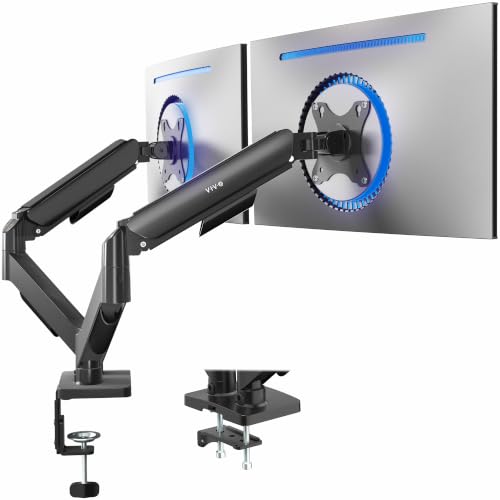
VIVO AeroPoise Dual Monitor Stand (Mechanical Spring Arms)
- BrandVIVO
- ModelSTAND-V002O
- Size / capacityDual Mount
- ColourBlack
- Warranty3 Year Warranty
Quick take: A spring-balanced articulating pair with a generous swivel range and a 3-year warranty.
Model STAND-V002O holds 17 to 32 inch flat or curved screens from 4.4 to 19.8 lbs on VESA 75×75 or 100×100. Toolless adjustment is promised. Its mechanical spring arms offer ±90° tilt, 180° swivel and 360° rotation. For tops, the C-clamp takes up to 3.1 inches, while the optional grommet mount handles up to 1.9 inches.
The back of the arms extends past the desk edge. A close wall can interfere. Spring arms also need re-tensioning after a monitor swap, or the screen will drift. The listing gives no dimensions or weight, though the open-top VESA plates allow slide-on mounting. Warranty is 3 years.
Pros:
- 19.8 lb ceiling — matches the HUANUO for heavier screens.
- Curved screens named — the listing explicitly covers them.
- Slide-on VESA plates — simpler monitor hang.
- Two mounting options — clamp up to 3.1 inches, grommet up to 1.9.
Cons:
- Arms overhang the desk rear — a problem against a wall.
- No dimensions or weight listed — harder to judge the build.
Final Thoughts
Perfect for: Desks with a thicker top and screens that get swapped occasionally. Think twice if: the desk sits tight to a wall.
MOUNT PRO Dual Monitor Stand (Free-Standing V-Base)

- BrandMOUNT PRO
- ModelPR1009
- Dimensions17.6 inches x 12.01 inches x 4.33 inches
- Weight8.49 pounds
- Size / capacityDual Free-Standing
- ColourBlack
In a nutshell: The only stand here that needs no clamp or hole, at the cost of desk footprint and screen size.
The V-shaped base is weighted, so the stand stays put. It takes 17.6 lbs per arm and screens with a limit of 27 inch (13 to 27 inches). Height reaches 17.6 inches, with ±90° tilt and swivel and 360° rotation. The package weighs 8.49 pounds and measures 17.6 x 12.01 x 4.33 inches. The base has a phone groove.
A free-standing base suits glass or thin desks where clamping is risky, though it eats up a good deal of surface area. The 27-inch ceiling excludes 32-inch panels, and its maker also advises hanging both screens at similar weights. A warranty isn’t listed.
Pros:
- No clamp or drilling — nothing touches the desk edge.
- Cable clips — included for tidying leads.
- Phone groove — a small base extra.
- Labelled parts — assembly is aimed at beginners.
Cons:
- 27-inch limit — larger screens are outside spec.
- 12-inch deep base — takes desk space the others free up.
Our Take
Great match for: Glass or rented desks where clamping is off the table.
How We Chose These Dual Monitor Stands
These picks come from comparing published specifications and documented features. None of the stands were tested hands-on. Per-arm weight range and VESA pattern were weighted most, then mounting type, adjustment range, arm span and warranty. Weight and VESA led. Before ordering, weigh each monitor without its stand, check for 75×75 or 100×100 holes on the back, and measure the desk thickness and material.
How to Pick the Best Monitor Stands for Dual Monitors
Match arm rating to monitor weight
Weight rating is the first filter. The HUANUO and VIVO state 4.4 to 19.8 lbs per arm; the ErGear and MOUNT PRO cap at 17.6 lbs. Too heavy and the arm sags; too light and the spring pushes the screen upward. Spring arms need re-tensioning after any monitor swap.
Check VESA, then size
The Video Electronics Standards Association governs the Flat Display Mounting Interface, usually four threaded holes on the monitor back. All four stands take 75×75 or 100×100. Without those holes, a VESA adapter kit is needed. Screen size is a diagonal measure of the visible area, so it ignores aspect ratio. Ultrawides are generally outside these specs even if the diagonal looks inside the range.
Clamp, grommet or free-standing
A C-clamp needs a solid edge. A grommet needs a hole and a thinner top. The VIVO lists 3.1 and 1.9 inch limits, and the HUANUO lists 0.59 to 3.54 inches. For glass or hollow desks, the free-standing MOUNT PRO avoids the issue. Electrical or load safety questions for desks are best checked against furniture standards from ANSI, since none of these listings cite a load certification.
Best laptop stands for dual monitors
Pairing a best laptop stands for dual monitors shortlist with an arm pair matters when the laptop screen acts as a third display. Raise it to match the monitors, and leave room under the arms for the stand’s footprint.
Our Final Recommendation
The HUANUO FlowLift is the overall winner: the highest 19.8 lb per-arm rating, two base types and a 5-year warranty. For lighter monitors, the ErGear is the best value. The VIVO AeroPoise suits spring-balanced adjustment on thicker desks, and the MOUNT PRO is the answer for glass tops. Weigh the monitors first; the rest follows.
Frequently Asked Questions
Will a dual monitor stand work on a glass or hollow desk?
Clamp stands generally need a solid edge. The HUANUO maker rules out glass and plastic, and a free-standing base like the MOUNT PRO avoids clamping. Hollow-core tops may need a reinforcement plate with any clamp.
What if my monitor has no VESA holes?
A VESA adapter kit can add a 75×75 or 100×100 pattern in many cases. Confirm the kit’s weight rating and the monitor’s construction first, since the stated size range doesn’t guarantee fit.
Why does my monitor arm keep drooping?
Drooping usually means the spring tension doesn’t match the screen weight, or the monitor is outside the rated range. Re-set the tension after any monitor swap, and check the weight against the per-arm limit.
Can two 32-inch monitors sit side by side?
On paper only the HUANUO, ErGear and VIVO list 32-inch support, and the ErGear states a 31.22-inch arm span, so two large screens may touch at the centre. Check panel width before ordering.