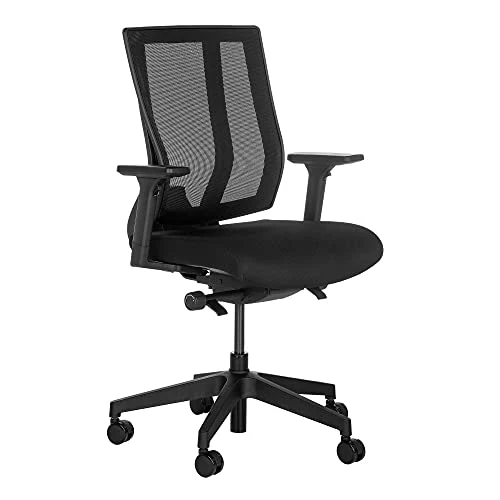
Finding the best corner desks under 100 comes down to hardware: board thickness, frame type and whether the outlets carry a real listing. This guide compares six L-shaped and triangle desks, using published specs only, from a laptop nook to a dual-monitor corner. Several are reversible. So the corner you own matters less than the footprint you can spare.
As an Amazon Associate we earn from qualifying purchases. This does not affect the price you pay.
CERTAIN CONTENT THAT APPEARS ON THIS SITE COMES FROM AMAZON. THIS CONTENT IS PROVIDED ‘AS IS’ AND IS SUBJECT TO CHANGE OR REMOVAL AT ANY TIME.
Short answer: the OLIXIS 47.2 Inch L Shaped Gaming Desk pairs a 12 mm board on a powder-coated steel frame with UL-listed outlets and a 19.7-inch-deep top.
| Product | Best for | Footprint (inches) | Power / charging |
|---|---|---|---|
| OLIXIS 47.2 Inch L Shaped Gaming Desk | Best overall | 47.2 x 31.5, 31.8 high | 2 AC, 1 USB-A, 1 Type-C (UL-listed module) |
| Pamray 40 Inch L Shaped Computer Desk | Best value | 39.37 x 27.56, 29.53 high | None listed |
| Korfile 59 inch L Shaped Computer Desk | Two-person setups | 59.0 x 18.8, 33.9 high | 3 outlets, 1 USB, 1 Type-C |
| SEDETA Farmhouse Corner Desk | Living-room corners | 31.5 x 31.5, 31.5 high | None listed |
| TIQLAB L Shaped Computer Desk | Laptop plus monitor | 40.0 x 27.6, 29.5 high | 2 AC, 1 USB, 1 Type-C |
| Armocity Triangle Corner Desk | Tightest corners | 26.77 x 29.53, 29.53 high | 2 AC, 3 USB |
CozyHomeCanvas is funded by affiliate commission. Our picks come from comparing published specifications and documented features against what matters in the category — no brand pays for a place on this page. If you buy through a link here we may earn a commission at no extra cost to you, and it pays for the research behind the next guide. Full disclosure.
OLIXIS 47.2 Inch L Shaped Gaming Desk (UL-Listed Outlets, Reversible)

Korfile 59 Inch L Shaped Computer Desk (Two-Person, Four Drawers)

OLIXIS 47.2 Inch L Shaped Gaming Desk (UL-Listed Outlets, Reversible)
- BrandOLIXIS
- ModelOL-FH-LXZ2CDD-47BK-YA0826
- Dimensions47.2 inches x 31.5 inches x 31.8 inches
- Weight39.24 pounds
- Size / capacity47.2 Inch
- ColourBlack
Quick take: The most complete package here for a bedroom or small office that needs a real second work surface and charging at the desktop.
The OLIXIS measures 47.2 x 31.5 x 31.8 inches with a 19.7-inch-deep desktop, enough room for a keyboard in front of a monitor without pushing the screen to the wall. The top is a 12 mm P2 board on a powder-coated steel frame. At 39.24 pounds it’s heavier than the Pamray or Armocity, which usually means more material in the frame.
The outlet module is listed as UL-certified, with 2 AC outlets, 1 USB-A and 1 Type-C (5V/2.1A) on a 4.9 ft cord. That 2.1A figure is modest, so expect phone-speed charging, not fast laptop charging. The manufacturer claims a 250 lb load rating, but 12 mm is thin for particleboard, and a long span with two monitors is where sag would show first. Taste decides the RGB riser, and the fabric drawer (8.9 x 18 x 6 inches) suits light items only.
Pros:
- UL-listed outlet module — the listing covers the power strip, which is the part most worth verifying on a budget desk.
- 19.7-inch desktop depth — keeps a monitor at a sensible distance from the keyboard.
- Reversible long side — the L can face left or right to suit the corner.
- Adjustable leveling feet — helps on carpet and uneven floors, where wobble usually starts.
Cons:
- 12 mm top — thinner than ideal under heavy gear, so sag over the span is a fair concern.
- Two-person assembly — the listing says 30 to 60 minutes with two people, so solo builders should plan around that.
- RGB riser — adds a cord and a remote for a feature many home offices won’t use.
Who Should Buy This
Best for: Buyers who want a reversible L with certified power at the desk. Skip if: Plain furniture is the goal, or the corner is narrower than 47.2 inches along the long side.
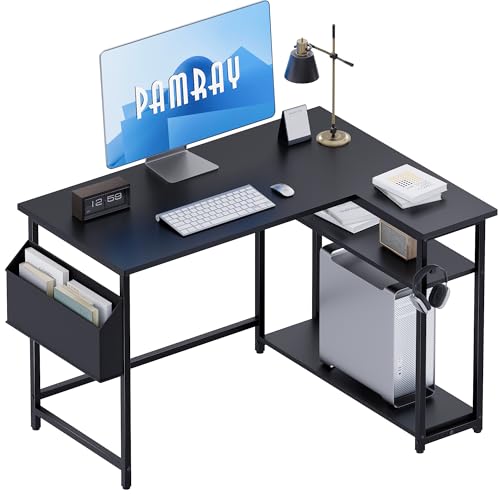
Pamray 40 Inch L Shaped Computer Desk (Reversible Side Shelves)
- BrandPamray
- ModelA7
- Dimensions39.37 inches x 27.56 inches x 29.53 inches
- Weight23.12 pounds
- Size / capacity40 Inch
- ColourBlack
The short version: A no-frills, lighter desk for anyone who wants an L-shape without paying for outlets.
The Pamray comes in at 39.37 x 27.56 x 29.53 inches and 23.12 pounds. The listing highlights reinforced side X-supports and six adjustable feet, both aimed at the wobble that plagues L-shaped desks. Six feet help on uneven floors, and that matters for the extra leg under the return.
The side shelf mounts left or right, and the two open shelves adjust in height. The trade-off is a 40-inch span that fits a laptop plus one monitor, but dual monitors will crowd it. No power features are listed. So a wall-plugged power strip is the buyer’s job.
Pros:
- Side X-supports — bracing along the sides targets racking, the usual failure on a light frame.
- Six adjustable feet — more leveling points than most desks at this size.
- Height-adjustable shelves — fits books, a small printer or storage bins.
- Compact depth — 27.56 inches in the short dimension suits tight rooms.
Cons:
- No built-in power — nothing listed, so cables run to a separate strip.
- Light at 23.12 lb — less mass than the heavier desks, so heavy monitors need care.
- Board thickness not listed — sag resistance can’t be judged from the listing.
Our Take
Best for: Value-minded buyers with a laptop-and-monitor routine. Skip if: Two large monitors or built-in charging is the plan.
Korfile 59 Inch L Shaped Computer Desk (Two-Person, Four Drawers)
- BrandKorfile
- ModelCD-026
- Dimensions18.8 inches x 59.0 inches x 33.9 inches
- Weight45.0 pounds
- Size / capacity59 Inch
- ColourBlack
In a nutshell: The widest desk on the list, built for two people or a long dual-monitor run.
At 59 inches wide, 33.9 inches high and 45 pounds, the Korfile is the largest and heaviest here. It combines particleboard with a steel frame and a listed capacity of 180 pounds, lower than the OLIXIS claim despite the bigger size. Board sag matters most at 59 inches. That’s why the lower rating matters.
It carries 3 outlets, 1 USB and 1 Type-C, plus two movable monitor stands and four non-woven fabric drawers. The listing doesn’t state a UL listing for the outlets, so check the product page before relying on them. Fabric drawers hold soft items. Heavy files don’t belong in them. The desk converts between an L-shape and a straight line.
Pros:
- 59-inch span — room for two workstations or a wide dual-monitor layout.
- Two movable monitor stands — screens can sit anywhere along the desk.
- Convertible layout — runs as an L or a straight desk.
- Five charging points — three outlets plus USB-A and Type-C.
Cons:
- Outlet certification not stated — the listing doesn’t name a UL listing.
- 180 lb rating — lowest stated capacity on a wide desk.
- Large footprint — 59 inches needs a wall run most small rooms lack.
Who Should Buy This
Best for: Shared setups and gaming-and-work sessions in a roomy corner. Skip if: Floor space is limited or certified outlets are a firm requirement.
SEDETA Farmhouse Corner Desk (Triangle Top With Drawer)

- BrandSEDETA
- Dimensions31.5 inches x 31.5 inches x 31.5 inches
- Weight43.5 pounds
- Size / capacityTriangular desk
- ColourBlack and Brown
Why it earns a spot: A true triangle desk that tucks into a living-room or bedroom corner and looks like furniture.
The SEDETA comes in at 31.5 x 31.5 x 31.5 inches and 43.5 pounds, with a Black and Brown finish and a drawer. Unlike an L-shape, a triangle has one fixed footprint and no reversing, so the orientation question just disappears. Marketing copy mentions solid wood, but the spec table lists no board type. The material claim stays unverified.
The desktop depth is the limit. A triangle gives you a deep point but little usable width, so a laptop fits and a full monitor setup won’t. Also, the title says white while the colour field says black and brown, so you’ll want to confirm the finish before buying. No outlets are listed. The copy’s own width and depth figures (44.5 and 31.5 inches) don’t match the spec table.
Pros:
- Triangle top — fills a corner with no dead space.
- Built-in drawer — frees up desktop clutter.
- 43.5 lb weight — heavier than most compact desks, which helps stability.
- Style-friendly look — suits a living room better than a gaming desk would.
Cons:
- Inconsistent listing details — colour and dimension figures conflict between title and copy.
- No power features — nothing listed for charging.
- Limited width — a keyboard and monitor will feel cramped.
Final Thoughts
Ideal for: Laptop work and decor-led corners. Pass on this if: A multi-monitor setup is needed, or the listing’s dimension conflict is a worry.
TIQLAB L Shaped Computer Desk (40 Inch, Power Outlets)

- BrandTIQLAB
- Dimensions27.6 inches x 40.0 inches x 29.5 inches
- Size / capacity40 Inch
- ColourMaple
Here’s the deal: A compact L-shape with built-in power for a laptop plus a single monitor.
The TIQLAB measures 27.6 x 40.0 x 29.5 inches in Maple, with 2 AC outlets, 1 USB and 1 Type-C. The listing cites FSC-certified wood and an X-frame to cut wobble, and it ships with a specialized L-shaped Allen wrench. Weight isn’t listed. So frame mass can’t be compared with the others.
Against the Pamray, the footprint is nearly identical, but the outlets are the difference. Under the desk sit two-tier open shelves, which suit books and files but not a bulky PC tower. Certification’s the gap. As with the Korfile, the listing doesn’t name any outlet certification, so verify it before use.
Pros:
- Built-in outlets — two AC plus USB and Type-C on a 40-inch desk.
- X-frame structure — aimed at reducing sway.
- Reversible return — the smaller section mounts left or right.
- Maple finish — a lighter look than the black desks.
Cons:
- Weight not listed — a key stability clue is missing.
- Outlet certification unstated — no listing is named.
- 40-inch span — dual monitors will be tight.
The Real Deal
Great match for: Small bedrooms needing charging and a laptop-plus-monitor layout. Think twice if: Certified power or a heavy frame is non-negotiable.
Armocity Triangle Corner Desk (Outlets and USB Ports)

- BrandArmocity
- Dimensions26.77 inches x 29.53 inches x 29.53 inches
- Weight21.0 pounds
- Size / capacitySmall
- ColourRustic Brown
The short version: The smallest desk here, a laptop station with a built-in power strip.
The Armocity measures 26.77 x 29.53 x 29.53 inches and weighs just 21 pounds, with 2 AC outlets and 3 USB ports and a 4.9 ft cord. At that size it fits a laptop, a lamp and a notebook, and little else. Space runs tight. The under-desk triangular shelf suits a mini printer or books.
Light weight is the double-edged spec. It moves easily, but there’s less mass resisting wobble. The marketing copy lists 26.8 inches square, slightly different from the spec table’s 26.77 x 29.53, so measure with a tape. The listing claims assembly in under 10 minutes, which would make it the quickest build here. No Type-C port is listed. Board material isn’t named either.
Pros:
- Smallest footprint — fits corners the others can’t.
- Integrated power strip — 2 AC and 3 USB at the desktop.
- Claimed 10-minute assembly — a one-person job by the listing.
- Multi-use shape — works as a desk, TV stand or vanity.
Cons:
- No Type-C — USB-A only for charging.
- 21 lb weight — light frames wobble more easily.
- Tiny surface — a monitor plus laptop won’t fit comfortably.
Who Should Buy This
Perfect for: Tight bedroom corners and laptop-only work. Not great if: A monitor, keyboard and mouse need space to spread out.
What We Looked For in the Best Corner Desks Under 100
These picks come from comparing published specifications, materials and documented features. None of the desks was tested hands-on. Footprint, board thickness, frame bracing and leveling feet were weighted most, since those decide wobble and sag. Outlets counted only with a named certification. Before ordering, measure both walls of the corner, the doorway and the stairs. Confirm finish and included features on the live listing, because titles here conflict with spec tables.
Buying Guide: Choosing a Corner Desk on a Budget
Match the Footprint to the Job
A 40-inch L fits a laptop and one monitor. Dual screens need the 47 to 59-inch class. Measure both wall runs, then subtract space for the chair to pull out. Chair space counts. Our corner desk buying guide covers the measuring steps in more detail.
Cheap L Shaped Desks: Where Wobble Comes From
Cheap L shaped desks mostly use particleboard with a laminate surface, and the joints loosen over time. Bracing does help. The Pamray’s side X-supports and the TIQLAB’s X-frame do it, and so do leveling feet. Retighten the hardware after the first week. Be aware that reassembly can loosen screw holes.
Check the Electrical Claim
Built-in outlets should carry a named listing from UL Solutions. Only the OLIXIS states one. Plug any built-in strip straight into the wall, never into another power strip, to avoid overloading.
Surface and Moisture
Melamine resins resist water better as their melamine content rises, but the listings don’t state the content. Wipe spills quickly. Avoid placing a desk in a damp corner, since swelling starts at unsealed edges.
Standards and Ergonomics
EN 527 is the European standard covering requirements and testing for office desks. None of these listings claims compliance. Flat-panel monitors free up desktop space compared with older CRTs, so a 40-inch desk is workable for a single screen. For eye-level screens, consider a monitor riser, and see our guide to organizing small rooms for layout ideas.
Our Final Recommendation
The OLIXIS 47.2 Inch L Shaped Gaming Desk is the overall winner, thanks to its UL-listed outlets, 19.7-inch depth and reversible layout. The Pamray 40 Inch L Shaped Computer Desk is the best value, with a braced frame and six leveling feet. The Korfile suits two-person setups. Its outlet certification isn’t stated. Pick the Armocity only for laptop-sized corners.
Frequently Asked Questions
Are affordable corner desks sturdy enough for dual monitors?
Yes, some are. Affordable corner desks with a 47 to 59-inch span suit two monitors better than 40-inch models. Board thickness decides sag, and only the OLIXIS lists it, at 12 mm. Use monitor arms or risers, level the feet and spread the weight over both legs.
What does reversible mean on an L-shaped desk?
Reversible means the return section bolts to either the left or right side during assembly, so one box suits either corner. The orientation’s set when the screws go in. Changing it later means partial disassembly, which can loosen the holes in particleboard.
Can I plug a built-in power strip into another power strip?
No. Built-in outlets should go straight into a wall socket, since daisy-chaining risks overloading the circuit. Check for a named listing. Look for one from a body such as UL Solutions, and note the USB output limits, such as the OLIXIS 5V/2.1A.