The task lamp vs overhead lighting question has a boring answer, but an important one: you almost always need both, and the right task lamp matters more than the ceiling fixture you already own. A single overhead light throws shadows across your hands and screen; a well-aimed desk lamp fills those shadows and makes a page readable without cranking the room to surgical brightness.
For most home offices, the Voncerus LED Desk Lamp with Clamp solves the actual problem—adjustable, clamped, shadow-free light wherever you’re working. The MCGOR 10-Inch Under Cabinet Lighting covers a different gap: the kitchen counter or closet where overhead light leaves you working in your own silhouette.
📌 This article contains affiliate links. As an Amazon Associate I earn from qualifying purchases, at no extra cost to you. Full disclosure.
CERTAIN CONTENT THAT APPEARS ON THIS SITE COMES FROM AMAZON. THIS CONTENT IS PROVIDED ‘AS IS’ AND IS SUBJECT TO CHANGE OR REMOVAL AT ANY TIME.
| Product | Best For | Buy Link |
|---|---|---|
| Voncerus LED Desk Lamp with Clamp | Focused desk work | Check Price |
| MCGOR 10inch Under Cabinet Lighting | Cabinet and counter bursts | Check Price |
How We Chose These Task Lighting Picks
We didn’t test these in a lab; we compared published specifications, documented features, and what’s missing from the listings against what actually matters in a home office. The Illuminating Engineering Society (IES) recommends a Color Rendering Index of 90 or higher for tasks that involve reading or detailed work. Neither product here publishes a CRI figure, which is exactly the kind of gap you should flag before buying. We weighted adjustable color temperature and brightness control heavily, because a fixed 6500K beam is useless at 10 p.m. Clamp stability and arm reach mattered for the desk lamp; battery runtime and motion-sensor reliability mattered for the under-cabinet bar. One thing to check yourself: the jaw width of the Voncerus clamp—the listing never states it, so measure your desk edge thickness first.
Voncerus LED Desk Lamp with Clamp (Adjustable Gooseneck Task Light)

MCGOR 10-Inch Under Cabinet Lighting (Motion-Sensor Counter Light)

Voncerus LED Desk Lamp with Clamp (Adjustable Gooseneck Task Light)
Short version: Buy this if your desk has a lip and you need light that follows your hands, not the room’s.
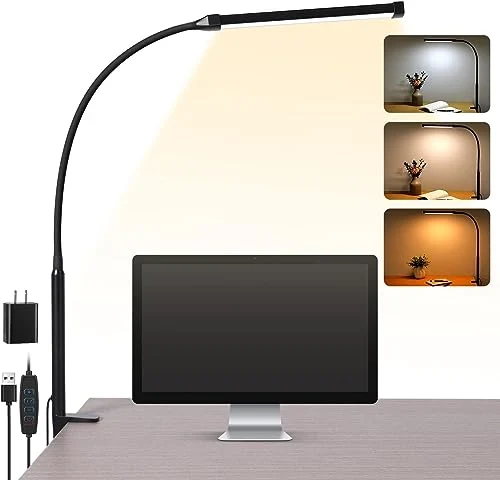
The Voncerus skips the base entirely and clamps to the desk edge, which frees up a surprising amount of usable surface. The 360° flexible gooseneck is the headline feature—on paper, it lets you direct light from above, the side, or even under a shelf. Three color temperatures (2700K warm, 4500K warm white, 6500K cool) and ten brightness steps cover the range from early-morning crispness to late-night wind-down. What the listing doesn’t say is the CRI. Without a published Color Rendering Index, you’re trusting the claim that it prevents glare, flicker, and ghosting—words that sound good but are not independently verified.
For daily use, the clamp mount is both the strength and the weakness. It demands a desk edge thick enough to grip, so a glass-top table or a flush-mounted desk is a no-go. The gooseneck’s long reach (the listing doesn’t give an exact inch count) should clear a monitor, but extended fully, it may droop over time with a heavier head. Compared to a freestanding lamp, this design trades portability for permanence—once clamped, it stays put. One honest annoyance: the clamp jaw width is never stated, so if your desk is unusually thick, you won’t know until it arrives.
Pros:
- 360° gooseneck — bend it to aim light exactly where you’re reading or typing.
- 3 color modes — switch between 2700K, 4500K, and 6500K to match the time of day.
- 10 brightness levels — fine-tune from nightlight to full-task brightness.
- Clamp mounting — frees desk space and stays put when you bump the cord.
- Eye-care claims — designed to reduce glare, flicker, and ghosting, though unverified.
Cons:
- No CRI number published — you cannot verify color accuracy for detailed work.
- Clamp-only design — useless on desks without an edge or tables with a skirt.
- Clamp jaw width unspecified — thick desks or rounded apron edges may not fit.
Why It Stands Out
Best for: Anyone with a standard desk edge who needs adjustable, space-saving task light for close work. Skip if: Your desk has no lip, you need to move the lamp between rooms, or you require verified high-CRI color rendering.
MCGOR 10-Inch Under Cabinet Lighting (Motion-Sensor Counter Light)
The real story: This is a battery-powered stick-on bar for closets and cabinets, not a replacement for your kitchen’s overhead light.
The MCGOR uses 40 LEDs across a 10-inch bar, which spreads light more evenly than a single puck. Its motion sensor is the upgraded part—setting it to auto-on means the light flicks on when a hand or body enters range, then presumably times out. The always-on mode exists for continuous work, and dimming is built in. But here’s the spec-sheet silence: the battery capacity and runtime are never stated. You don’t know if ‘always-on’ means two hours or eight, and that matters when you’re prepping dinner under a cabinet.
Under a cabinet, the motion sensor has to separate a person reaching for a spice jar from a cat walking by or a curtain shifting. The listing claims ‘upgraded’ sensing, but without a detection range or sensitivity spec, false triggers are a real risk. For task work, a 10-inch bar covers a small counter section; a full run of cabinets would need several units. And since the color temperature isn’t listed, you can’t tell if the light is warm or cool before buying—a problem if you’re matching existing under-cabinet fixtures.
Pros:
- Motion sensor mode — auto-on when you wave your hand or step close, hands-free convenience.
- Always-on option — keeps light steady for longer prep tasks without re-triggering.
- Dimmable output — adjust brightness to avoid glare bouncing off glossy counters.
- 40 LEDs over 10 inches — better light distribution than a single puck light.
- Rechargeable and stick-on — no wiring or drilling, and you can move it as needed.
Cons:
- No battery runtime listed — in always-on mode it may die mid-task, and you won’t know until it’s dark.
- Motion sensor may false-trigger — pets, curtains, or ceiling-fan movement can turn it on randomly.
- No color temperature or CRI given — you cannot judge light quality before ordering.
Final Thoughts
Perfect for: Under-cabinet task lighting in short bursts—finding a pan, reading a label, or illuminating a dark closet shelf. Not great if: You need continuous bright light for detailed kitchen work or want to replace a wired fixture.
Task Lamp vs Overhead Lighting: How to Decide What to Buy First
Overhead lighting gives you general illumination—enough to navigate a room without tripping. A task lamp gives you focused light where your eyes need it most. Most people already have the overhead part; what they’re missing is the focused beam. That’s why we recommend buying a task lamp before upgrading a ceiling fixture, unless your room is genuinely dark.
Understanding the difference between task lamp and overhead lighting comes down to focus
Overhead light scatters in all directions, which is fine for walking around but creates shadows on a desk when your head or hands block the beam. A task lamp delivers light from a specific angle, aimed at the work surface. The Voncerus’s gooseneck lets you come from the side to avoid monitor reflections; the MCGOR’s bar spreads light across a counter but only covers a small area. If you’re reading fine print or doing detail work, a task lamp is non-negotiable.
Color temperature and CRI: the specs that actually matter
Kelvin tells you whether light appears warm (2700K) or cool (6500K). For long desk sessions, cooler white (4500K–5000K) keeps you alert during the day, while warm white (2700K–3000K) is easier on the eyes after dark. The Voncerus covers all three bases. CRI, the Color Rendering Index, tells you how accurately colors appear. A CRI below 90 makes reds and blues look muddy—bad for editing photos, reading charts, or sorting fabric. Neither product here names a CRI, so if color accuracy is critical, look elsewhere or add a separate high-CRI bulb.
According to the U.S. Department of Energy (Energy Saver), LED lighting uses up to 90% less energy than incandescent bulbs, which means a task lamp is a negligible addition to your electric bill compared to running a multi-bulb ceiling fixture.
Clamp vs free-standing: mounting decides everything
A clamp lamp like the Voncerus demands a desk edge and stays put. A freestanding base (which this article does not review) works anywhere but eats desk space. For under-cabinet use, the MCGOR’s stick-on design avoids drilling, but adhesive can weaken on grease-prone kitchen surfaces. Check your desk thickness and cabinet underside before ordering.
Our Final Recommendation
For desk work, the Voncerus LED Desk Lamp with Clamp is the one to buy. Its gooseneck and three color modes solve the real problem—shadow-free, adjustable light—and the clamp frees precious desk space. The MCGOR 10-Inch Under Cabinet Lighting is not a desk lamp; it’s a supplementary counter light for short, hands-free tasks in cabinets and closets. Buy the Voncerus first, then add the MCGOR if your kitchen corners stay dark.
Frequently Asked Questions
Should I choose a task lamp or overhead lighting for my home office?
You need both. Overhead light provides general brightness, but a task lamp eliminates the shadows overhead light creates when you lean forward. The Voncerus’s gooseneck lets you aim light at the paper, not the screen, which is the single biggest improvement you can make for eye comfort.
How do I avoid shadows when working at a desk with overhead light?
Position your task lamp on the side opposite your writing hand. If you’re right-handed, put the lamp on the left so your hand doesn’t block the beam. A clamp lamp like the Voncerus makes this easy because you can attach it to any edge and angle the gooseneck sideways.
What’s the best color temperature for long office hours?
For daytime focus, 4500K to 5000K cool white keeps you alert. After dark, switch to 2700K to 3000K warm white to reduce blue light exposure before bed. The Voncerus offers 2700K, 4500K, and 6500K presets, so you can match the time of day.
Can I use under-cabinet lights as a replacement for overhead kitchen lighting?
No. A 10-inch bar like the MCGOR covers a small counter area and is meant for close-up tasks, not whole-room illumination. It works well alongside overhead lights to fill shadows under cabinets, but it will never match the spread of a ceiling fixture.
How long do rechargeable under-cabinet lights last on a single charge?
The MCGOR listing does not state its battery capacity or runtime, which is a red flag. In motion-sensor mode, most similar units run for weeks because the light is off most of the time. In always-on mode, expect hours, not days—so plan to recharge it regularly if you use that setting.